How long should a product launch video be? Eight films, timed
Aim for 45 seconds. Where the time goes in eight launch films, what a viewer misses at 15 and 30 seconds, and the length each platform allows.

By Mahad Khalid, Founding EngineerPublished · Updated · 8 min read
A product launch video should run 30 to 60 seconds, and 45 is a good target: about 6 seconds before your product appears, 25 for it to do one job, 10 for proof and 4 for the logo. We timed eight launch films our studio made, and the job alone took 18 to 31 seconds. Stop any of the eight at 30 seconds and the viewer never reaches its end card.
This is for founders planning a launch on Product Hunt, X, LinkedIn or an app store who need a length to write to. Platform limits and other studios' figures come from their own pages, opened on 25 November 2026. The timings are ours, from eight films you can watch on this site, and we sell launch videos, so treat those films as our house style.
How long are real launch videos?
Motion's two averages are a little over a minute, two other studios say 30 to 60 seconds, and our median is 47.
| Source | What it reports |
|---|---|
| Motion the Agency, its own launch projects | Average 1:09; shortest 23 seconds; longest over 4 minutes; 23% longer than 90 seconds |
| Motion the Agency, "over 80 videos from brands we don't work with" | Average 1:15; shortest 0:27; longest 2:56 |
| Hound Studio | "usually 30–60 seconds" |
| Flowjam | "the 30 to 60 second film" |
| Our 79 complete films, 20 October to 22 November 2026 | Median 47 seconds; 68 of them run 40 to 60 |
Motion's two samples are the widest we found, and it makes videos with and without a voiceover, while ours have none. Averages don't tell you what to leave out, so we timed what is inside the films.
Where do the seconds go?
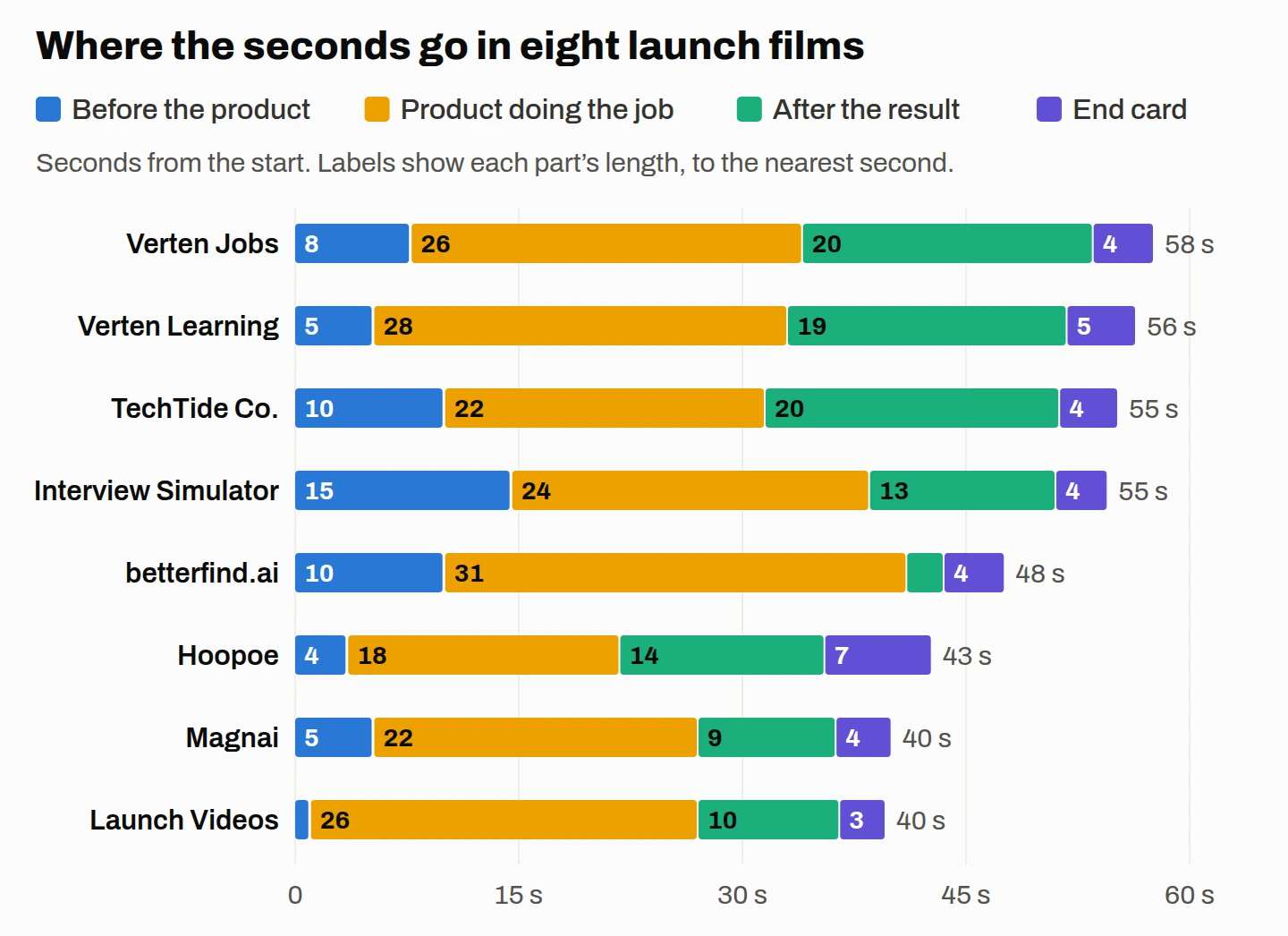
We split each of our eight sample films into four parts: before the product appears, the product doing its job, what comes after the result, and the end card.
| Film | Product appears | Result shown | Brand name on the end card | Film ends |
|---|---|---|---|---|
| Verten Jobs | 7.75 s | 34 s | 53.5 s | 57.6 s |
| Verten Learning | 5.25 s | 33 s | 51.75 s | 56.4 s |
| TechTide Co. | 10 s | 31.5 s | 51.25 s | 55.2 s |
| Interview Simulator | 14.5 s | 38.5 s | 51 s | 54.5 s |
| betterfind.ai | 10 s | 41 s | 43.5 s | 47.6 s |
| Hoopoe | 3.5 s | 21.75 s | 35.5 s | 42.7 s |
| Magnai | 5.25 s | 27 s | 36.25 s | 40 s |
| Launch Videos | 1 s | 27 s | 36.5 s | 39.6 s |
(Disclosure: betterfind.ai is made by our parent company. Launch Videos is a product of BetterfindAI.)
The medians are 6.5 seconds before the product, 25 for the job, 13 after the result and 4 for the end card. Showing one task from start to finish takes 26 seconds in the shortest film, Launch Videos, and 26 in the longest, Verten Jobs. The 18 seconds between the two go on everything else.
What do you lose at 15, 30 or 45 seconds?
Here is what a viewer would have seen if each film stopped early. "Proof" is a figure, quote or customer presented as real and given its own moment on screen. Six of the eight films have one.
| If the film stopped at | Product on screen | Result shown | Proof shown | Brand name on the end card |
|---|---|---|---|---|
| 15 seconds | 8 of 8 | 0 of 8 | 0 of 6 | 0 of 8 |
| 30 seconds | 8 of 8 | 3 of 8 | 2 of 6 | 0 of 8 |
| 45 seconds | 8 of 8 | 8 of 8 | 6 of 6 | 4 of 8 |
| 60 seconds | 8 of 8 | 8 of 8 | 6 of 6 | 8 of 8 |
At 15 seconds every film has shown the product, some partway through the job, and none has reached its result, so treat that length as a teaser. At 30 you can show one quick job if you plan for it. By 45, all eight films have shown their result and all six proofs have appeared. Four would still need trimming to reach their end card in time, and the next section says where.
The table also says something about our own work. Wistia, which says it analysed over 13 million videos on its platform for its 2026 report, puts average engagement at 52% for videos under a minute, which it explains as viewers typically watching half of the video. Half of the Interview Simulator film is 27 seconds. Its score of 91 arrives at 38.5, so a viewer who leaves halfway misses the best moment. We'd move it earlier.
What should you cut first?
Cut what comes after the result. That part runs from 2.5 to almost 20 seconds in our films, and it is longest in the three longest ones: about 19 to 20 in Verten Jobs, Verten Learning and TechTide.
Verten Jobs is a good example. Its candidate is hired at 34 seconds. Then the film shows a median of 5 days to shortlist, 11,000+ verified candidates, 2,400+ open roles, 380+ hiring employers, 16 signals, LMIA labels, verified badges, "Free" and two closing lines before the logo. Going straight from the first of those figures to the end card would make it about 43 seconds.
In this order, we'd cut:
- The second and third proof. Keep the figure a stranger would repeat.
- Lists. Services, categories, countries and integrations belong on your website.
- The wind-up. Magnai's search bar is up by 5.25 seconds and Hoopoe's product by 3.5.
- Typing. In the Verten Jobs film a search takes from 8 to 14 seconds to type.
Leave the end card alone. Ours last 3 to 7 seconds in total, and the finished card, with every line on screen, holds for 1.4 to 5.2. The median is 2.4, and we wouldn't go under 2.
How long should it be for each platform?
Plan on 30 seconds for app stores and ads, and 30 to 60 for a launch post:
| Where | Limit or rule | What we'd post |
|---|---|---|
| Product Hunt | Gives no length (our guide) | 30 to 60 seconds |
| X | 20 minutes for a post; 125 for Premium or verified accounts (X developer docs) | 30 to 45 seconds |
| LinkedIn post | 15 minutes (LinkedIn Help) | 30 to 60 seconds |
| LinkedIn ad | 15 to 30 seconds recommended, to "qualify for all possible placements" (LinkedIn) | 30 seconds or less |
| App Store preview | 15 to 30 seconds (Apple) | 25 to 30 seconds, only in-app footage |
| Google Play | "only the first 30 seconds autoplays" (Google) | 30 seconds, with the app in the first 10 |
| YouTube Shorts | Up to 3 minutes, square or vertical (YouTube Help) | A separate vertical cut |
The limits in the middle column are the platforms' own, and the last column is our suggestion. If you have seen 140 seconds quoted for X, its developer docs now list that only for direct messages from accounts without Premium.
An app store preview is a different film from a launch video. Apple says previews "must show only content within the app itself", and Google advises showing the core features within the first 10 seconds and leaving out lines such as "Download now".
How to plan a 30-second version
Give the opening 3 seconds, the job 18, one proof 5 and the end card 4. Eighteen is the quickest job in our eight films (Hoopoe's: finish a book, post about it, vote on the next one), so pick a task your product does in about three steps.
Write the lines before you open an editor, and read them aloud with a stopwatch. If you can't read every line twice in its time on screen, the film has too many words. The rest of the plan is in our guide to making a launch video step by step.
When is longer better?
When the viewer already wants the product. Motion puts product demos at 60 to 180 seconds, and Wistia suggests 1 to 5 minutes to educate or explain. A buyer comparing two tools will sit through a three-minute walkthrough. Someone scrolling past your launch post won't, so make the short film first and link the long one from your site.
How long are the films we make?
Usually 40 to 60 seconds. Launch Videos (launchvideos.app) makes a 1920×1080, 60 fps film from your website or screenshots, cut to music, for $30. Of the 79 complete films our studio made from 20 October to 22 November 2026 (customers', samples and our own), the median took 34 minutes from request to finished file, 73 took under an hour and the slowest took 102 minutes. All 79 came out at 1920×1080 and 60 fps. Say the length you want in your notes, and one change is free within 48 hours.
We don't make a set of lengths. If you need a 15-second teaser, a 30-second app preview or a vertical Short as well, cut them from the film in an editor, or use Launch Video Maker, which sells 15, 30 and 60-second reels in 16:9, 9:16 and 4:5.
How we timed the films
We took frames every second through each film, then every quarter of a second around each moment (ffmpeg -ss), so times are accurate to about 0.25 seconds.
- Product appears: the first frame where the product's own interface, or a drawing of it, can be read. TechTide sells a service, so we used its four-stage panel.
- Result shown: the first frame where the film's task is done: "Hired.", "Verified", a full chart, a score of 91, "named first", the vote decided, "Approved", and the finished film playing.
- Proof: we counted Interview Simulator's and Magnai's quotes, Verten Jobs' and Verten Learning's figures, Hoopoe's figures and the client names in our own film. TechTide's and betterfind.ai's figures are illustrative, so they don't count.
- Brand name on the end card: the first frame where it can be read in full.
Choosing those moments takes judgement, and another person could move one by a second or so. Eight films by one studio show one house style, and we found no study of which length sells more.
FAQ
Is 90 seconds too long for a launch video?
For a social post, we think so, unless a person is speaking and has something to say. In Motion's two samples, 23% and 25% of videos ran past 90 seconds.
How many lines of text fit in a 45-second launch video?
Roughly 12 to 15 short lines, at about two seconds each, once you allow for the moments when nothing new is on screen. That is our suggestion, so test it by reading aloud.
Should I make one video or several lengths?
Make one good film first. Cut a 30-second version when you have a use for it, such as an app store page or an ad.
Read next
-
Examples
Product launch video examples: 8 real films, measured
Eight real launch videos made from product websites, with their length, first words, structure and ending measured, and what to copy from each.
· 8 min read
-
Making a launch video
How to make a product launch video from your website, step by step
Make a 40 to 60 second launch video from your real product: the story, the scenes, the song, the export settings and where to post it.
· 8 min read
-
Making a launch video
Launching tomorrow? How to get a launch video today
How to get a launch video by the hours you have left, with a free screenshot script we tested and the turnaround times sellers list.
· 7 min read